
 OpenAI - ChatGPT, Sora
 Google - Gemini, Nano Banana
 Anthropic - Claude
 xAI - Grok
 Deepseek
 Alibaba - Qwen
 ByteDance - Doubao
 All Models
 Enterprise Plans
 AI Application Development
 AI Translator API
 AI SEO/GEO Service
 GEO-Optimized PR Service
 Web Scraping Service
 OpenClaw
 Top AI Tools
 Top AI Robots
 Log in















How to Buy OpenAI API Credits (And What to Do If It Doesn't Work)
To buy OpenAI API credits: Sign in → Go to Billing → Add payment method → Enable pay-as-you-go. Credits deduct automatically as you use the API.
This works for single-model projects. For production systems using multiple AI providers, unified API platforms offer better scalability and cost management.
Common issues include payment rejections, rate limits, fragmented billing across providers, and code changes when switching models.
What Are OpenAI API Credits?
OpenAI API credits are prepaid or pay-as-you-go funds that enable access to OpenAI's language models through their API. Each API call deducts credits based on token usage.
Credits can be purchased directly through your OpenAI account dashboard and work exclusively for OpenAI models like GPT-4, GPT-3.5, and DALL-E.
How Do You Buy OpenAI API Credits?
The official process requires five steps:
- Sign in to your OpenAI account at platform.openai.com
- Navigate to Billing → Payment methods
- Add a valid credit card (some regions/cards not supported)
- Enable pay-as-you-go or purchase prepaid credits
- Set optional usage limits to control spending
Once configured, API usage automatically deducts from available credits. No additional action required for each API call.
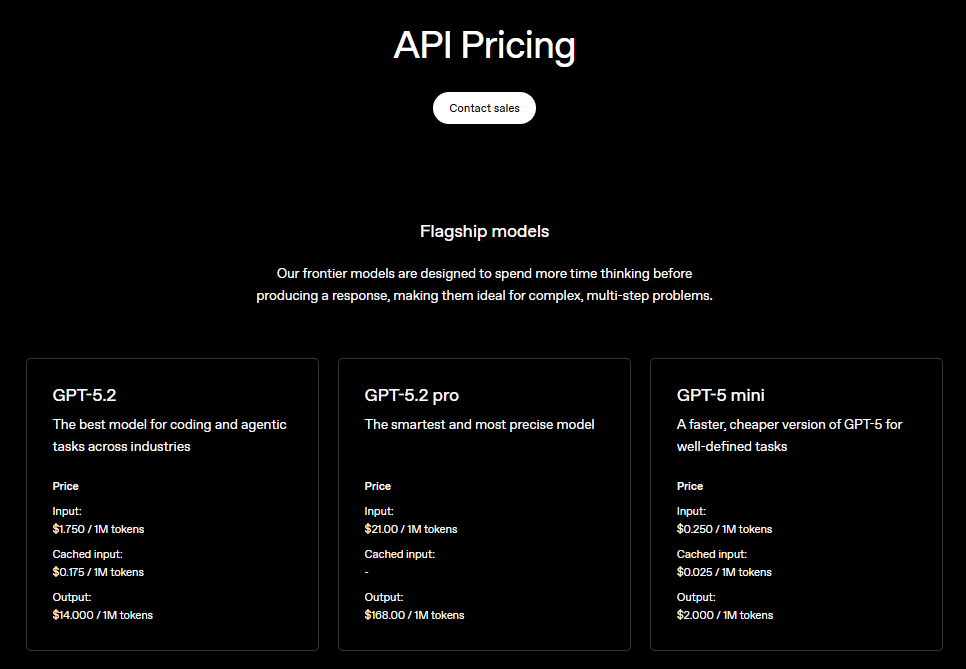
What Problems Occur When Buying OpenAI API Credits?
Payment Method Rejections
OpenAI does not accept all payment methods. Regional restrictions and card types frequently cause failed transactions, especially for teams outside the United States.
Rate Limits and Throttling
Even with available credits, API calls may be restricted due to:
- Organization-level rate limits
- Model-specific usage caps
- Unpredictable throttling during high demand
Fragmented Billing Across Providers
When teams use multiple AI models (Claude, Gemini, OpenAI), they manage separate dashboards, invoices, and usage limits. This creates operational overhead as systems scale.
Code Changes Required for Model Switching
OpenAI credits only work for OpenAI models. Switching providers requires:
- Integrating new SDKs and authentication methods
- Modifying request/response formats
- Refactoring code across the application stack
When Is Buying OpenAI Credits Sufficient?
Direct credit purchases work well if your project meets these criteria:
- Uses only OpenAI models with no plans to test alternatives
- Has predictable, stable usage patterns
- Does not require fallback options during outages
- Operates in supported payment regions
For production systems requiring redundancy, multi-model support, or cost optimization across providers, unified API platforms become necessary as operational requirements evolve.
What Are the Hidden Costs of OpenAI API Credits?
The real cost extends beyond token pricing. Engineering and operational overhead includes:
- Development time spent rewriting code to switch models
- Administrative burden of managing multiple billing systems
- Service interruptions without fallback mechanisms
- Vendor lock-in when pricing structures or limits change
- Opportunity cost from inability to quickly test alternative models
As systems scale, these operational costs often grow faster than direct API usage costs.
What Is a Unified AI API?
A unified AI API provides a single interface for accessing multiple AI model providers. Instead of managing separate credentials and code for each provider, developers use one API format across OpenAI, Claude, Gemini, and other models.
Key Advantages
- Single API format eliminates provider-specific integration code
- Centralized billing consolidates invoices and credit management
- Model switching requires configuration changes, not code refactoring
- Automatic fallback routing maintains service during provider outages
- Cost optimization through intelligent provider selection
Platforms like AI.cc provide unified API access to OpenAI, Claude, Gemini, and 300+ models through a single endpoint.
This approach reduces dependency on any single provider while maintaining compatibility with existing workflows. View technical documentation
When Should You Use a Unified API?
Consider a unified API platform if your project requires:
- Frequent model comparison for cost or performance optimization
- Fallback capabilities during provider outages or rate limiting
- Multi-region deployment with varying provider availability
- Predictable billing across multiple AI providers
- Scalability beyond a single model provider
- Reduced engineering overhead for model switching
For production systems with these requirements, managing credits provider-by-provider becomes a scalability bottleneck.
How Do You Transition from Single-Provider to Multi-Provider?
The transition typically follows this progression:
- Phase 1: Single-model usage with direct OpenAI credits
- Phase 2: Testing alternative models requires separate integrations
- Phase 3: Production systems need fallback and redundancy
- Phase 4: Unified API adoption for operational efficiency
This transition is simpler when implemented before codebases become tightly coupled to a single provider's SDK and authentication patterns.
Start with a minimal unified API example that maintains OpenAI compatibility while adding multi-provider flexibility. See production-ready implementation
Test a unified API with OpenAI models without changing existing code structure. Add multi-provider support when needed.
Summary
Buying OpenAI API credits is straightforward for single-model projects: sign in, add payment, enable billing.
Common issues include payment rejections, rate limits, fragmented billing across providers, and code changes when switching models.
For production systems, unified API platforms reduce operational overhead by providing single-interface access to multiple providers.
The transition from single-provider to multi-provider infrastructure is simpler when implemented before tight coupling occurs in your codebase.