
 OpenAI - ChatGPT, Sora
 Google - Gemini, Nano Banana
 Anthropic - Claude
 xAI - Grok
 Deepseek
 Alibaba - Qwen
 ByteDance - Doubao
 All Models
 Enterprise Plans
 AI Application Development
 AI Translator API
 AI SEO/GEO Service
 GEO-Optimized PR Service
 Web Scraping Service
 OpenClaw
 Top AI Tools
 Top AI Robots
 Log in









How to Use Codex: A Comprehensive Guide to OpenAI's Revolutionary AI Coding Agent

In the rapidly evolving world of artificial intelligence, tools that bridge the gap between human creativity and machine efficiency are transforming industries. One such groundbreaking innovation is OpenAI's Codex, a cloud-based software engineering agent designed to revolutionize how developers write, debug, and maintain code. If you're searching for "how to use Codex," you've come to the right place. This guide will not only walk you through the step-by-step process of getting started but also delve into its broader implications in the AI industry. From boosting productivity in software development to enabling non-coders to build applications, Codex represents a pivotal shift in AI-assisted programming.
As we explore how to use Codex effectively, we'll cover everything from basic setup to advanced techniques, while expanding on its role in the AI ecosystem. By the end of this article, you'll have a deep understanding of why Codex is hailed as a game-changer, backed by real-world applications and future trends. Let's dive in.
What is OpenAI Codex? Understanding the Basics
OpenAI Codex is more than just an AI tool—it's an intelligent agent powered by codex-1, a specialized version of OpenAI's advanced models optimized for software engineering. Introduced in a research preview in May 2025, Codex allows users to delegate coding tasks such as writing features, fixing bugs, answering codebase questions, and even proposing pull requests. Each task runs in its own isolated cloud sandbox environment, preloaded with your repository, ensuring security and efficiency.
Unlike traditional code completion tools, Codex operates as an autonomous agent that can work on multiple tasks in parallel. It's built on reinforcement learning from real-world coding scenarios, enabling it to generate code that mimics human styles, adheres to instructions precisely, and iteratively runs tests until success. This makes it ideal for developers looking to accelerate workflows without compromising quality.
In the broader AI industry, Codex builds on the legacy of earlier models like GPT-3 and the original Codex from 2021, which powered GitHub Copilot. Today, it's part of a competitive landscape where AI coding agents are becoming essential. Companies like Anthropic with Claude Code and Google with Vertex AI are vying for dominance, but OpenAI's focus on agentic workflows—where AI acts independently—sets Codex apart. According to industry reports, AI tools like Codex could boost developer productivity by up to 50%, allowing teams to focus on innovation rather than rote tasks.

Why Use Codex? The Impact on the AI Industry
Before we get into the "how to use Codex" tutorial, it's worth exploring why this tool matters in the AI industry. The rise of generative AI has democratized access to complex technologies, and Codex exemplifies this trend in software development.
Productivity Gains and Economic Value
In 2025, AI coding tools have become a cornerstone for enterprises. OpenAI reports that internal teams used Codex to build and ship the Sora Android app in just 28 days with a four-person team—a feat that highlights its efficiency. Industry analysts from Gartner predict that AI-augmented software engineering will reach mainstream adoption within 2-5 years, moving from the "Peak of Inflated Expectations" to the "Plateau of Productivity."
Economically, the impact is profound. Coding is one of the most successful AI applications, with startups attracting billions in funding. Tools like Codex reduce time-to-market, lower development costs, and enable small teams to compete with giants. For instance, independent developers have reported doubling their productivity by switching to Codex, as seen in viral projects like OpenClaw.
Transforming Software Development Workflows
Codex shifts developers from coders to reviewers. Instead of writing every line, you describe tasks in natural language, and the AI handles the execution. This agentic approach—where AI manages long-running tasks autonomously—is reshaping roles. Developers now orchestrate AI agents, focusing on high-level design, ethics, and integration.
In the AI industry, this fosters innovation. Enterprises use Codex for automating repetitive tasks in finance, healthcare, and more. For example, in financial services, it automates complex algorithms, enhancing decision-making. As AI evolves, Codex-like tools could lead to "vibe coding," where non-technical users build apps via prompts, blurring lines between creators and consumers.
Competitive Landscape and Future Trends
OpenAI's Codex app launch in February 2026 intensifies competition. Rivals like Anthropic's Claude Opus excel in general-purpose agents, but Codex's macOS app allows managing multiple agents in parallel, supporting up to 30-minute independent runs. This positions OpenAI to capture market share in a space where coding tools drive AI startup revenues.
Looking ahead, the future of AI in software development includes seamless integration across IDEs, real-time collaboration with human-AI teams, and ethical considerations like bias mitigation. By 2030, experts foresee AI handling 80% of routine coding, freeing humans for creative problem-solving. Codex is at the forefront, evolving through self-improvement—OpenAI uses it to enhance itself, with the majority of its code generated by Codex.

Step-by-Step Guide: How to Use Codex
Now, let's get practical. This section provides a detailed tutorial on how to use Codex, optimized for beginners and pros alike. We'll cover setup, basic usage, and advanced features.
Step 1: Setting Up Codex
To start using Codex, you need access via ChatGPT Pro, Team, Enterprise, or Plus plans. Here's how:
- Download the Codex App: Currently available for macOS (with Windows and Linux notifications available). Visit the OpenAI website and download from the Codex page.
- Install and Sign In: Open the app and log in with your ChatGPT account or OpenAI API key. This grants access to the cloud-based agent.
- Select a Project: Choose a folder or GitHub repository. Codex preloads your codebase into a sandbox. For GitHub integration, authorize access to select branches.
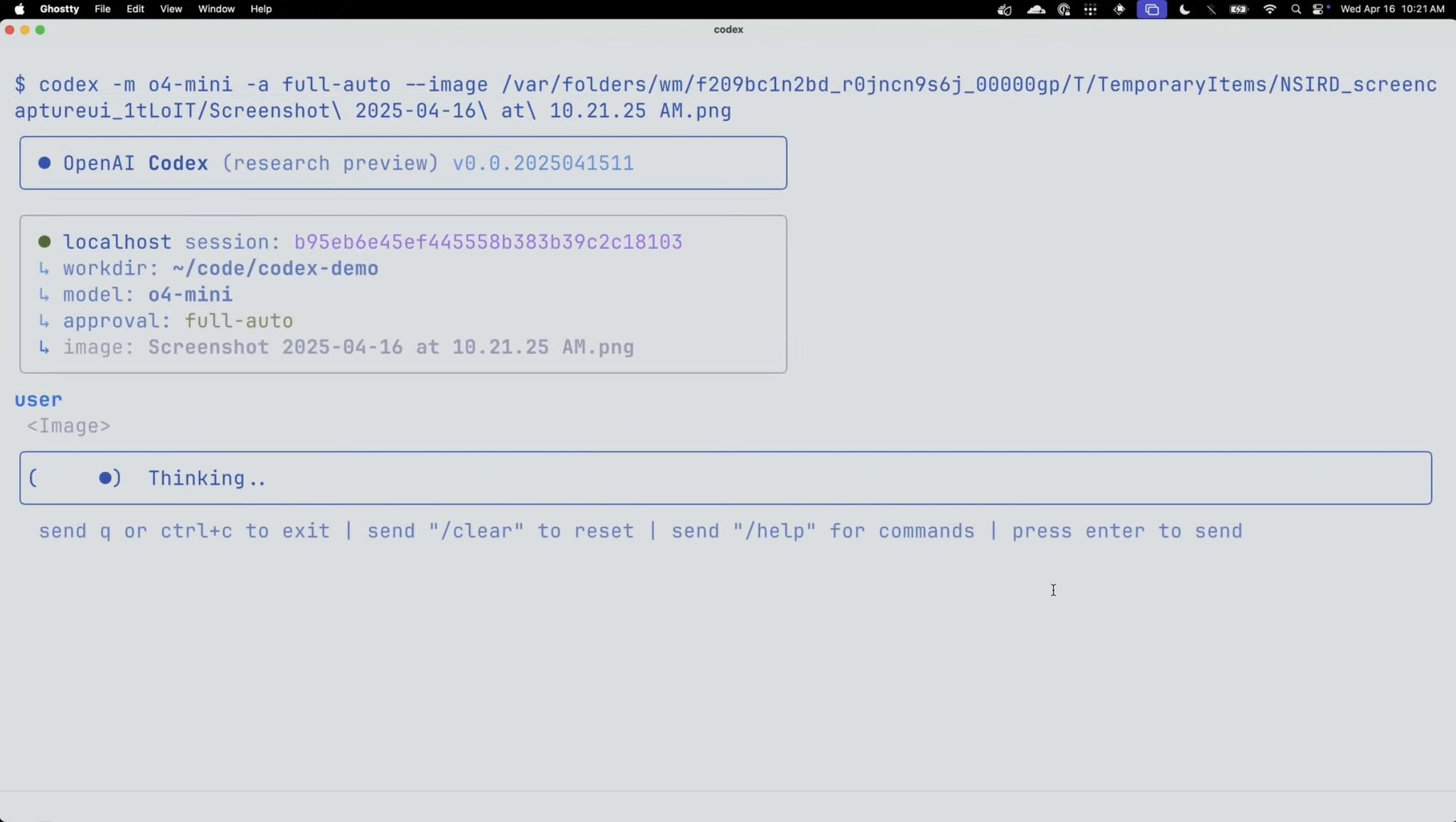
If you're using the CLI version, install via npm: npm install -g @openai/codex. Run codex to initialize, and edit ~/.codex/config.toml for custom settings like model providers.
Step 2: Basic Usage – Assigning Tasks
Access Codex through the ChatGPT sidebar or the dedicated app. To assign a task:
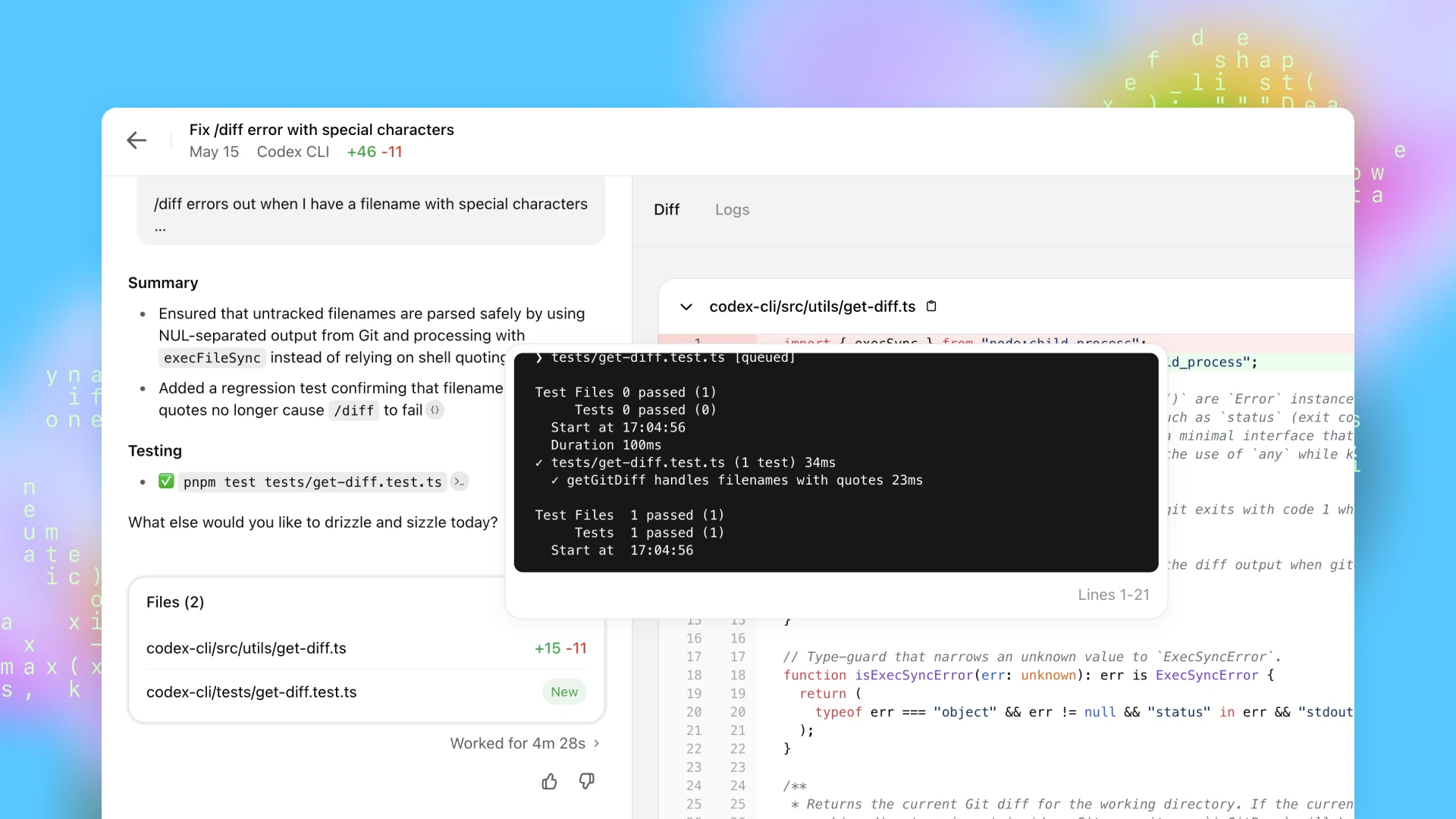
- Type a prompt like "Fix the /diff error with special characters in filenames" and click "Code."
- For questions: "What does this function do?" and click "Ask."
Codex processes in an isolated environment, running tests and linters. It returns a summary, diff, logs, and files changed. Approve changes, and it can propose pull requests.
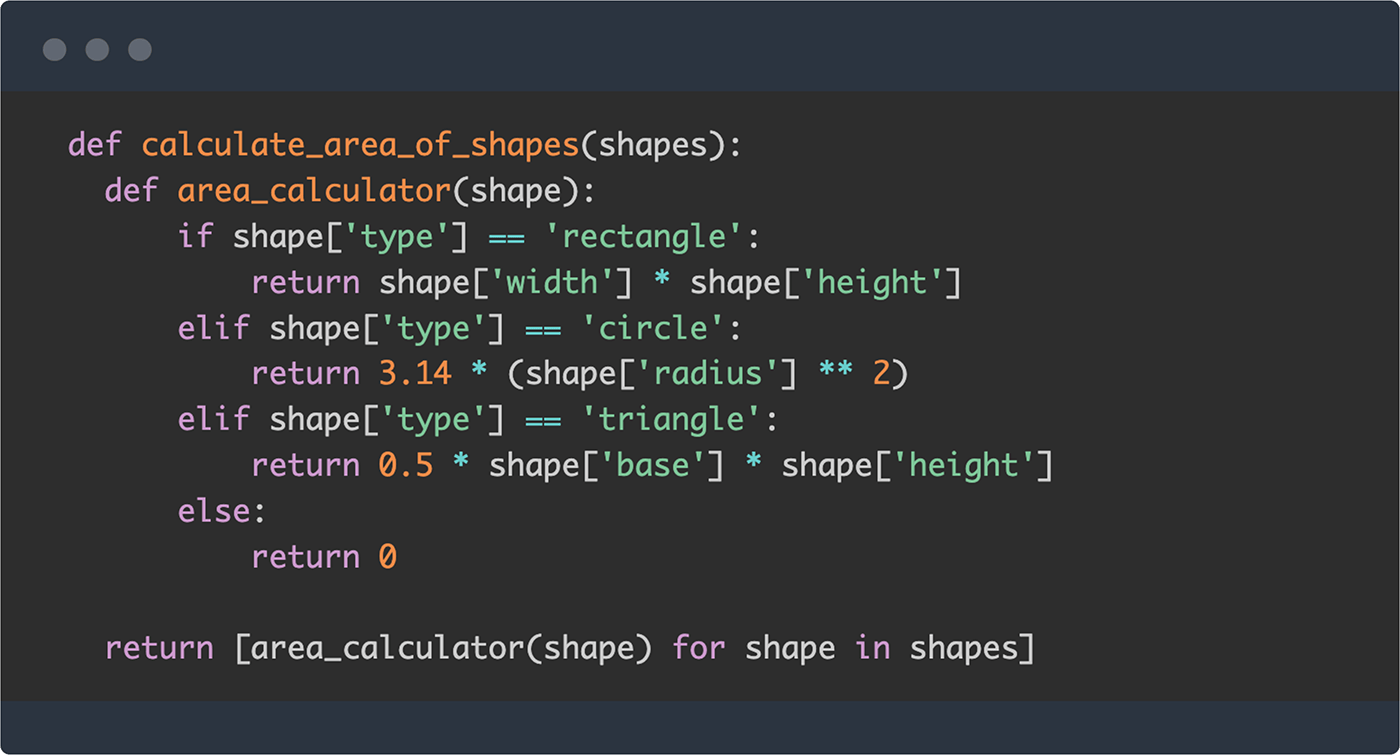
Example: In a Python project, prompt "Implement a function to calculate areas of shapes." Codex generates code like:
def calculate_area_of_shapes(shapes): def area_calculator(shape): if shape['type'] == 'rectangle': return shape['width'] * shape['height'] elif shape['type'] == 'circle': return 3.14 * shape['radius'] ** 2 elif shape['type'] == 'triangle': return 0.5 * shape['base'] * shape['height'] else: return 0 return [area_calculator(shape) for shape in shapes]This demonstrates Codex's ability to handle multi-language tasks seamlessly.
Step 3: Using the CLI and IDE Extensions
For terminal lovers, the Codex CLI is lightweight and powerful. Install as above, then run codex -m o4-mini for model selection. Commands include /model to switch models and /help for options.
Integrate with VS Code: Install the Codex extension from the marketplace. It allows in-IDE tasks, like "Explain this codebase" or "Fix build errors."
Best practice: Use full-auto approval for trusted sessions, but suggest mode for reviews.
Step 4: Advanced Techniques – Optimizing with AGENTS.md and Prompting
To maximize Codex, create an AGENTS.md file in your repo. This guides the AI on navigation, testing commands, and project standards. Example:
# AGENTS.md - Run `npm test` for unit tests. - Use ESLint for linting. - Prefer functional programming in JavaScript.Prompting patterns enhance results:
- Be Specific: "Add a regex test confirming filenames with quotes don't fail /diff."
- Iterative Feedback: If output is off, refine: "Revise to handle NUL-separated output."
- Chain Tasks: Run multiple agents in the app for parallel work, like one for frontend, another for backend.
In API mode, use the Codex SDK for custom integrations. Prompt with structured inputs for consistency.
Step 5: Testing and Debugging with Codex
Codex excels at debugging. Prompt "Debug why this loop causes infinite recursion" and it analyzes, suggests fixes, and tests. It iteratively runs until passing, reducing manual effort.
For larger projects, use the app's command center to monitor agents, automate workflows, and collaborate over long tasks.
Real-World Applications: Codex in Action Across Industries
Codex's versatility extends beyond tutorials. In the AI industry, it's used for:
- Finance: Automating algorithm generation for trading systems, reducing errors in complex calculations.
- Healthcare: Building data pipelines for patient analytics, ensuring compliance with regulations.
- E-commerce: Optimizing recommendation engines via natural language prompts.
Case Study: OpenAI's internal use. Teams leverage Codex for onboarding, where it explains unfamiliar codebases quickly. In incidents, it investigates and proposes fixes, slashing resolution times.
Another example: A startup used Codex to prototype an AI chatbot in days, integrating with APIs like Polygon for finance data—without deep coding expertise.
Challenges and Ethical Considerations in Using Codex
While powerful, Codex isn't flawless. Potential issues include:
- Hallucinations: AI might generate incorrect code; always review.
- Security: Sandboxing helps, but avoid sensitive data.
- Dependency: Over-reliance could stunt skill development.
Ethically, in the AI industry, tools like Codex raise questions about job displacement. However, they augment roles, creating demand for AI overseers. OpenAI emphasizes responsible use, with features like bias checks in prompts.

Integrating Codex with Other AI Tools
Codex pairs well with OpenAI's ecosystem. Use it alongside the API Playground for testing prompts before deployment.
For broader AI workflows, combine with GitHub Copilot for real-time suggestions. In enterprises, integrate via APIs for custom agents.
Future integrations might include multi-modal capabilities, like generating code from images or voice.

The Broader AI Industry Context: Trends and Predictions
The AI industry is booming, with coding agents like Codex at the helm. Market projections show AI software development tools growing to $100 billion by 2030.
Key Trends:
- Agentic AI: Autonomous agents handling end-to-end tasks.
- Hybrid Human-AI Teams: Developers as conductors.
- Open-Source Evolution: Codex's CLI is open-source, fostering community contributions.
Predictions: By 2028, AI could write 70% of code in enterprises, per McKinsey. Codex's self-improvement loop—using itself to build better versions—accelerates this.
In education, Codex democratizes coding, teaching via interactive lessons.
Conclusion: Embracing the Future of AI-Powered Development
OpenAI's Codex represents a transformative leap in how we approach software development. From automating repetitive tasks to enabling non-technical users to build sophisticated applications, this AI coding agent is reshaping the industry landscape. As we've explored throughout this comprehensive guide, mastering how to use Codex effectively can dramatically accelerate your development workflow, enhance code quality, and free you to focus on creative problem-solving.
The journey from understanding Codex's fundamentals to implementing advanced techniques positions you at the forefront of the AI revolution in software engineering. Whether you're a solo developer seeking productivity gains, an enterprise team automating complex workflows, or a startup racing to market, Codex offers the intelligent assistance needed to compete in today's fast-paced technological ecosystem.
As AI continues to evolve and Codex becomes even more sophisticated through its self-improvement capabilities, early adopters who master this tool now will be best positioned to leverage future innovations. The future of software development is collaborative, intelligent, and increasingly autonomous—and with Codex, that future is already here.