OpenAI - ChatGPT, Sora
 Google - Gemini, Nano Banana
 Anthropic - Claude
 xAI - Grok
 Deepseek
 Alibaba - Qwen
 ByteDance - Doubao
 All Models
 Enterprise Plans
 AI Application Development
 AI Translator API
 AI SEO/GEO Service
 GEO-Optimized PR Service
 Web Scraping Service
 OpenClaw
 Top AI Tools
 Top AI Robots
 Log in


                                        const { OpenAI } = require('openai');

const api = new OpenAI({
  baseURL: 'https://api.ai.cc/v1',
  apiKey: '',
});

const main = async () => {
  const result = await api.chat.completions.create({
    model: 'mistralai/Mistral-7B-Instruct-v0.2',
    messages: [
      {
        role: 'system',
        content: 'You are an AI assistant who knows everything.',
      },
      {
        role: 'user',
        content: 'Tell me, why is the sky blue?'
      }
    ],
  });

  const message = result.choices[0].message.content;
  console.log(`Assistant: ${message}`);
};

main();
                                        import os
from openai import OpenAI

client = OpenAI(
    base_url="https://api.ai.cc/v1",
    api_key="",
)

response = client.chat.completions.create(
    model="mistralai/Mistral-7B-Instruct-v0.2",
    messages=[
        {
            "role": "system",
            "content": "You are an AI assistant who knows everything.",
        },
        {
            "role": "user",
            "content": "Tell me, why is the sky blue?"
        },
    ],
)

message = response.choices[0].message.content

print(f"Assistant: {message}")


Product Detail
🤖 Mistral (7B) Instruct v0.2 Overview
The Mistral-7B-Instruct-v0.2 Large Language Model (LLM) is an advanced, instruction fine-tuned variant building upon its predecessor, Mistral-7B-Instruct-v0.1. Designed by Mistral AI, this model excels at generating high-quality, detailed responses tailored to specific user prompts. Its robust architecture is rooted in Mistral-7B-v0.1, incorporating innovative features such as Grouped-Query Attention, Sliding-Window Attention, and a sophisticated Byte-fallback BPE tokenizer. This combination ensures efficient processing and versatile language handling.
🌟 Core Architectural Innovations
Mistral-7B-Instruct-v0.2 integrates several cutting-edge architectural components that contribute to its superior performance:
- ➡️ Grouped-Query Attention (GQA): This feature significantly enhances inference speed and reduces memory footprint for larger batch sizes, making the model more efficient without compromising performance.
- ➡️ Sliding-Window Attention (SWA): SWA allows the model to manage exceptionally long sequences more effectively. By focusing attention on a fixed-size window of tokens, it maintains contextual accuracy and coherence over extended inputs.
- ➡️ Byte-fallback BPE Tokenizer: This advanced tokenizer improves the model's adaptability by handling a wider array of characters and symbols. It ensures robust processing of diverse text inputs, minimizing unknown tokens.
🏆 Why Choose Mistral-7B-Instruct-v0.2?
Compared to many competitors, the Mistral-7B-Instruct-v0.2 LLM offers distinct advantages for various applications, including content generation, Q&A systems, and intricate task automation:
- ✅ Superior Instruction Following: The model's fine-tuning specifically focuses on obeying instructions, leading to more precise and predictable outputs based on user commands.
- ✅ Enhanced Contextual Understanding: Leveraging Grouped-Query and Sliding-Window Attention, it efficiently processes long sequences, maintaining focus on relevant input parts for coherent and contextually accurate responses.
- ✅ Broad Language Versatility: The Byte-fallback BPE tokenizer ensures the model can handle a vast range of characters and symbols, making it highly adaptable across diverse linguistic contexts.
💡 Maximizing Your Use: Practical Tips
Unlock the full potential of Mistral-7B-Instruct-v0.2 with these effective strategies:
- ✨ Step-by-Step Instructions (Chain-of-Thought Prompting): Decompose complex tasks into smaller, manageable steps. This approach, inspired by chain-of-thought prompting, guides the LLM through intermediate reasoning, improving accuracy and making debugging easier. For example, breaking down a report generation into "summarize," "generate questions," and "write report" steps.
- ✨ Example Generation for Guidance: Prompt the LLM to generate examples with explanations to guide its reasoning process. This helps the model better understand expectations and produce more precise outputs. For instance, asking it to generate three questions with detailed explanations for each.
- ✨ Explicit Output Formatting: Clearly specify the desired output format (e.g., "write a report in Markdown format"). This direct instruction ensures the model adheres to your preferred structure, saving time on post-processing.
💻 API Integration Example
❓ Frequently Asked Questions (FAQ)
Q1: What is the primary improvement in Mistral-7B-Instruct-v0.2 compared to v0.1?
✅ The v0.2 model is an improved instruction fine-tuned version, meaning it is more capable and precise in following specific user instructions to generate desired outputs.
Q2: How do Grouped-Query Attention and Sliding-Window Attention benefit the model?
✅ These features enable the model to process long sequences more efficiently, enhancing inference speed, reducing memory usage, and maintaining contextual accuracy for more coherent responses.
Q3: Can Mistral-7B-Instruct-v0.2 handle complex tasks?
✅ Yes, by employing strategies like step-by-step instructions (chain-of-thought prompting) and example generation, the model can effectively tackle complex problems by breaking them down into simpler components.
Q4: Is the model versatile in handling different text inputs?
✅ Absolutely. The inclusion of a Byte-fallback BPE tokenizer allows the model to process a wider range of characters and symbols, significantly improving its versatility and adaptability to diverse text types.
Q5: How can I ensure the model's output is in a specific format?
✅ You can explicitly instruct the LLM to output in a certain format by directly asking, for example, "write a report in Markdown format."
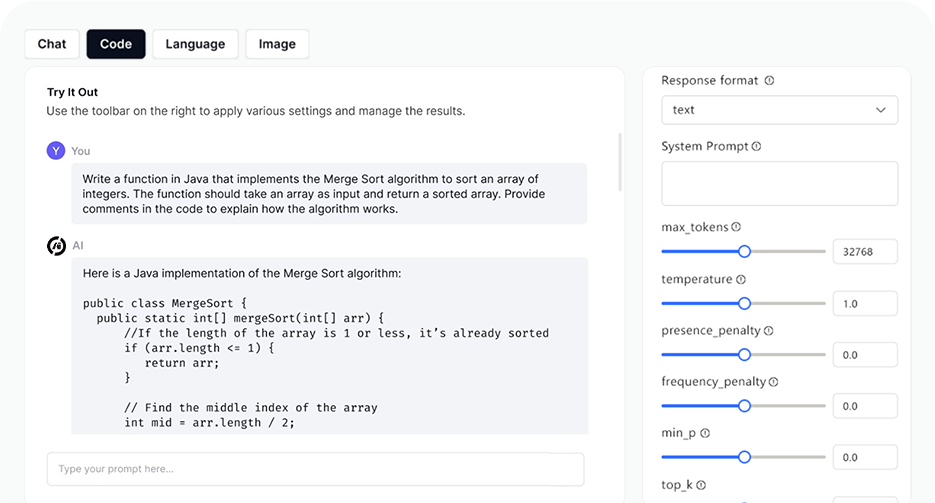
AI Playground