
 OpenAI - ChatGPT, Sora
 Google - Gemini, Nano Banana
 Anthropic - Claude
 xAI - Grok
 Deepseek
 Alibaba - Qwen
 ByteDance - Doubao
 All Models
 Enterprise Plans
 AI Application Development
 AI Translator API
 AI SEO/GEO Service
 GEO-Optimized PR Service
 Web Scraping Service
 OpenClaw
 Top AI Tools
 Top AI Robots
 Log in
ChatGPT Free Users Can Now Use Scheduled Tasks — Here's What You Can Do
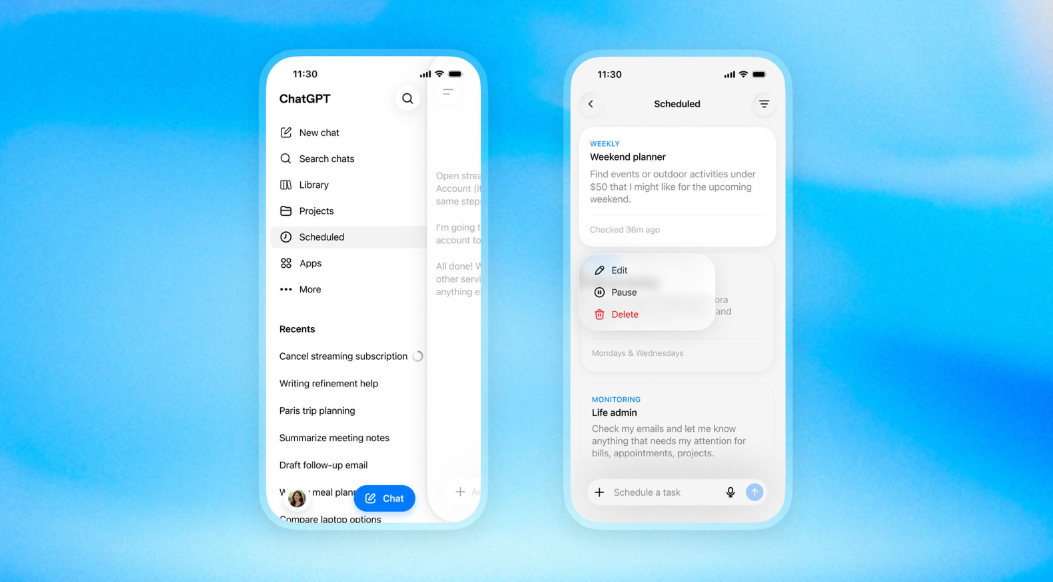
ChatGPT's scheduled tasks — the feature that lets you set up automated prompts to run in the background — is now available to free users. Previously locked behind a paywall since its launch in June 2026, OpenAI has opened the scheduling hub to everyone, including free and Go accounts.
The catch? Free users get three active tasks, each running at most once per day, with flexible delivery windows instead of exact times. Paid subscribers, meanwhile, get a bigger upgrade: event-triggered tasks that fire automatically when something happens in Gmail, Slack, or GitHub.
This is a meaningful shift. AI scheduling was a paid-only feature across the board — Google's Gemini and Anthropic's Claude both require paid plans for task scheduling. OpenAI is the first major AI company to offer this capability to free users. Whether that's generous or a calculated upsell depends on how you use it.
What Free Users Actually Get
Let's be specific about what's available and what's not. The details matter because the gap between free and paid is significant.
| Plan | Active Tasks | Frequency | Event Triggers |
|---|---|---|---|
| Free | 3 | Once per day max | No |
| Go | 3 | Once per day max | No |
| Plus | 5 | Up to once per hour | Yes (Gmail, Slack, GitHub) |
| Business / Edu | 10 | Up to once per hour | Yes (Gmail, Slack, GitHub) |
| Pro / Enterprise | 15 | Up to once per hour | Yes (Gmail, Slack, GitHub) |
Here's what each limitation means in practice:
3 active tasks max. You can have three scheduled prompts running at the same time. If you want to add a fourth, you'll need to pause or delete an existing one. For most free users, three is enough for daily routines.
Once per day max. Free tasks can't run hourly. You get one execution per day, and the delivery window is flexible — "morning," "afternoon," or "night" — not an exact time. If you need something checked every hour or at a precise moment, you'll need a paid plan.
No event triggers. This is the biggest limitation. Free users can only set up time-based tasks — "check this every morning at 9 AM." They can't create tasks that fire when something happens, like "when I get a new email, summarize it" or "when a pull request is opened, review it." Event triggers are reserved for Plus, Pro, Business, and Enterprise.
No task sharing. The new task-sharing feature — where you can share a scheduled task with other users — is available to all plans. But creating and managing tasks from shared templates may require a paid plan for advanced configurations.
What You Can Actually Do With Free Scheduling
Despite the limitations, free scheduling opens up several practical use cases. Here are the ones that genuinely save time:
These aren't theoretical use cases — they're the kinds of small, repetitive tasks that eat up mental bandwidth. The value isn't that ChatGPT does something extraordinary. It's that you don't have to remember to do it yourself.
How to Set Up Your First Scheduled Task
Setting up a scheduled task on the free plan is straightforward:
Step 1: Open ChatGPT and look for "Scheduled" in the sidebar. This is the scheduling hub that OpenAI introduced in June and has now opened to free users.
Step 2: Click "New task" and describe what you want ChatGPT to do. Be specific. Instead of "check the news," try "summarize the top 5 tech news stories from today in bullet points."
Step 3: Choose your schedule. Free users can select "once" for a one-time task, or "daily" for a recurring task. You'll also choose a delivery window: morning, afternoon, or night.
Step 4: Review and confirm. ChatGPT will show you a preview of what the task will do and when it will run. Make sure the prompt is clear enough that ChatGPT can execute it without additional context.
Step 5: Wait for results. ChatGPT will run the task in the background and deliver results to your sidebar. You can check the Scheduled section anytime to see completed runs and manage active tasks.
The Real Value: Building AI Habits
OpenAI's decision to make scheduling free isn't purely altruistic. It's a distribution strategy.
Task scheduling itself isn't new — it's been available to paid users since June. But giving free users access to the feature does two things for OpenAI:
It builds habits. Once you set up a morning news digest or a daily price check, you start relying on it. That daily interaction with ChatGPT becomes part of your routine. And routines are hard to break — especially when they're tied to a paid upgrade path.
It demonstrates value. Free users who experience automated tasks are more likely to understand why a paid plan might be worth it. The three-task limit and once-per-day frequency are designed to be useful enough to hook you, but restrictive enough to make you want more.
This is the same playbook that worked for Spotify, Dropbox, and every other freemium product: give away enough to build the habit, then charge for the premium experience.
How It Compares to Other AI Scheduling
ChatGPT isn't the only AI with scheduling capabilities, but it's now the only one offering them for free.
Google Gemini has scheduling features, but they're limited to paid subscribers. Gemini's scheduling integrates deeply with Google apps — Calendar, Gmail, Tasks — which makes it powerful if you're in the Google ecosystem. But you can't access it without a Gemini Advanced subscription.
Anthropic's Claude also requires a paid plan for scheduling. Claude's strength is in longer, more complex tasks — research, writing, analysis — but its scheduling capabilities are more limited than ChatGPT's in terms of frequency and automation depth.
ChatGPT now offers the most accessible scheduling of the three. Free users get a taste of automation, while paid users get advanced features like event triggers and hourly execution. The trade-off is that ChatGPT's scheduling is less integrated with specific ecosystems compared to Gemini's Google integration. If you want to test scheduling across multiple AI providers, AICC provides unified API access to OpenAI, Anthropic, and Google models.
For users who want to compare scheduling capabilities across providers, AICC's multi-model API lets you test automated prompts against multiple models. You can set up the same scheduled task using different providers and compare how each handles execution quality, response depth, and reliability. AICC also gives you access to DeepSeek and other budget-friendly models for tasks where cost matters more than cutting-edge capability.
What Event Triggers Mean for Paid Users
While free users get time-based scheduling, paid users are getting something more powerful: event-triggered tasks.
Instead of running on a fixed schedule, event-triggered tasks fire in response to real-world events:
- Gmail: "When I receive an email from [sender], summarize it and draft a reply"
- Slack: "When someone posts in #announcements, give me a summary"
- GitHub: "When a pull request is opened, review the code changes"
This moves ChatGPT beyond scheduled reminders and into reactive automation — the territory previously occupied by tools like Zapier and IFTTT. The difference is that ChatGPT understands natural language and can handle complex, nuanced tasks that rule-based automation tools can't.
Event triggers can run up to 30 times per hour and 720 times per day across all your event-triggered tasks. That's enough for most professional workflows.
Privacy and Security Considerations
Scheduled tasks run in the background with your account's permissions. Here's what you need to know:
Connected apps have standing access. If you set up a Gmail-triggered task, ChatGPT has ongoing access to your inbox. Grant the narrowest permissions the task needs, and review what a shared task is configured to do before copying it.
Tasks execute with your identity. When a scheduled task runs, it uses your ChatGPT account. Any actions taken — web searches, email summaries, data retrieval — happen under your credentials.
Shared tasks can be copied. The new task-sharing feature means other users can adopt your scheduled tasks. If you've created a task with specific permissions or data access, be aware that others might replicate it.
What's Coming Next
The scheduled tasks rollout is part of OpenAI's broader push to make ChatGPT more proactive. Instead of waiting for you to ask questions, ChatGPT is increasingly able to act on its own — checking sources, monitoring changes, and delivering insights on a schedule.
The likely next steps: more event sources (Twitter, RSS feeds, calendars), deeper integration with third-party apps, and more sophisticated task chaining — where one task's output triggers another. OpenAI is clearly building toward a future where ChatGPT isn't just a chatbot but a personal automation layer.
For free users, the practical takeaway is simple: try it. Set up a morning news digest, a daily price check, or a recurring reminder. The three-task limit is enough to experience the value without any commitment. And if you find yourself wanting more — more tasks, more frequency, more automation — that's exactly the point where a paid plan starts to make sense.
AI scheduling is no longer a premium feature. It's a free tool that anyone can use. The question is whether you'll use it — and if you want to compare how different models handle automated prompts, AICC gives you access to over 300 models through a single API.
This article is part of AICC's ongoing coverage of how AI tools are changing the way we work, automate, and create. AICC provides a unified API gateway to over 300 AI models from leading providers — giving developers, educators, and businesses the flexibility to choose the right model for every task. Whether you need scheduling capabilities, browser automation, or production API access, AICC's OpenAI-compatible API lets you switch between providers without changing your code. Learn more at www.ai.cc.