
 OpenAI - ChatGPT, Sora
 Google - Gemini, Nano Banana
 Anthropic - Claude
 xAI - Grok
 Deepseek
 Alibaba - Qwen
 ByteDance - Doubao
 All Models
 Enterprise Plans
 AI Application Development
 AI Translator API
 AI SEO/GEO Service
 GEO-Optimized PR Service
 Web Scraping Service
 OpenClaw
 Top AI Tools
 Top AI Robots
 Log in
This is not a
video generator.
It's a world model.
Demis Hassabis didn't come to Google I/O 2026 to announce a feature. He came to announce a new kind of AI — a system that doesn't just process inputs and produce outputs, but builds an internal understanding of reality deep enough to simulate what should happen next. Here's what Gemini Omni actually is, what it does today, and how it stacks against every competitor — without the hype.
Every major AI lab has a video generator now. Runway, Kling, Pika, Veo — they all follow roughly the same model: write a prompt, click generate, wait, get a clip. If you don't like it, re-prompt and try again.
Gemini Omni works differently. And that difference is more significant than most of the I/O 2026 coverage has captured. That is a bold claim — so this article breaks down exactly what it is, what it actually does today, how it compares to every major competitor, how to access it right now, and where it's genuinely heading.
What is Gemini Omni?
Gemini Omni is Google DeepMind's new multimodal AI model family, announced May 19, 2026. Its defining characteristic combines two things that previously lived in separate systems: Gemini's language reasoning and Google's generative media models. Demis Hassabis said it combines Gemini with Veo, Nano Banana, and Genie — describing it as "our new model that can create anything from any input."
In plain terms: give it a photo, a voice recording, existing video, a text description, or any combination — and it produces a video. Then you keep talking to it to refine what it made. The first version available is Gemini Omni Flash. A more capable Gemini Omni Pro is in development for professional advertising and video production.
Google positions Omni as a world model rather than a standard video generator — designed to understand physical environments, predict cause and effect, and process text, audio, images, and video together. Unlike Sora, Runway, or Veo, which mainly generate clips from text prompts, Omni aims to simulate real-world behavior more accurately.
When an object falls, it falls correctly. When two materials collide, the interaction reflects real physics — not a pattern-matched approximation of what those interactions look like in training footage.
The honest caveat, stated by Google itself: more substantial Omni updates are "coming later this year," meaning what shipped is an early, fast variant — not the full world model the AGI rhetoric implies. The physics and world-understanding capabilities will deepen significantly in later releases.
Core features of Gemini Omni Flash.
Most AI video tools accept a text prompt. Some accept a reference image alongside it. Gemini Omni accepts all of the following — simultaneously, in a single prompt:
- Text — descriptions, scripts, instructions
- Images — product photos, character references, style guides
- Audio — voice recordings, music tracks, ambient sound
- Existing video — clips to remix, extend, or transform
Rather than stitching inputs together, the model reasons across them to produce one output — then accepts further changes through conversation. Upload a product photo, paste a brand tagline, record a voice note describing the mood, and Omni synthesizes a single coherent video from all three. No separate processing steps. No manual assembly.
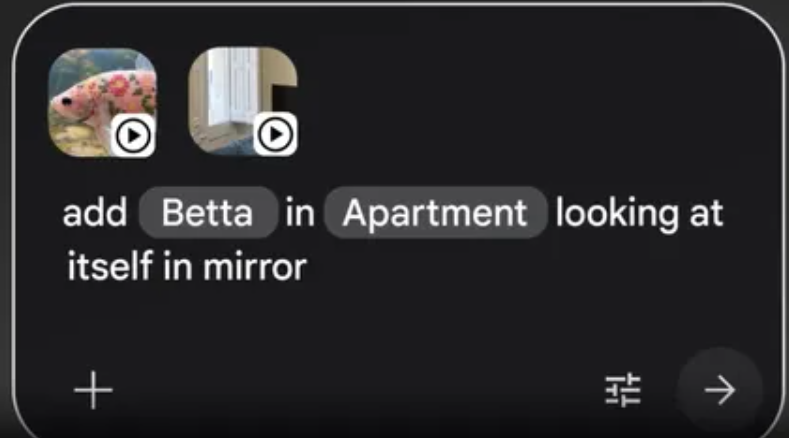
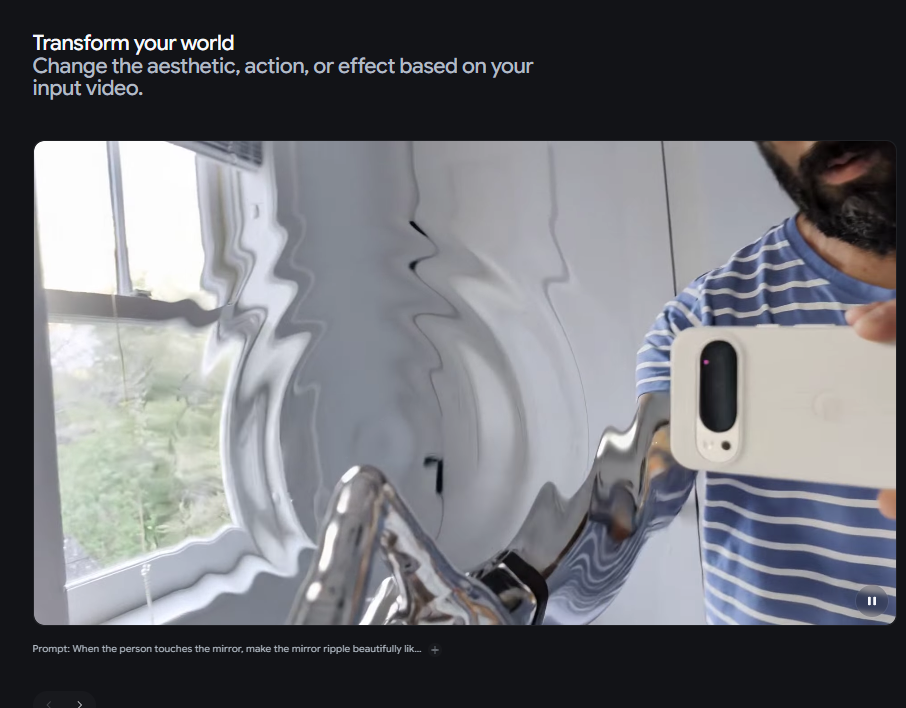
This is Omni's most differentiated capability. Each instruction "builds on the last," and past directions persist across turns so the video evolves coherently as you iterate. Instead of classic timelines and layers, you say what to change:
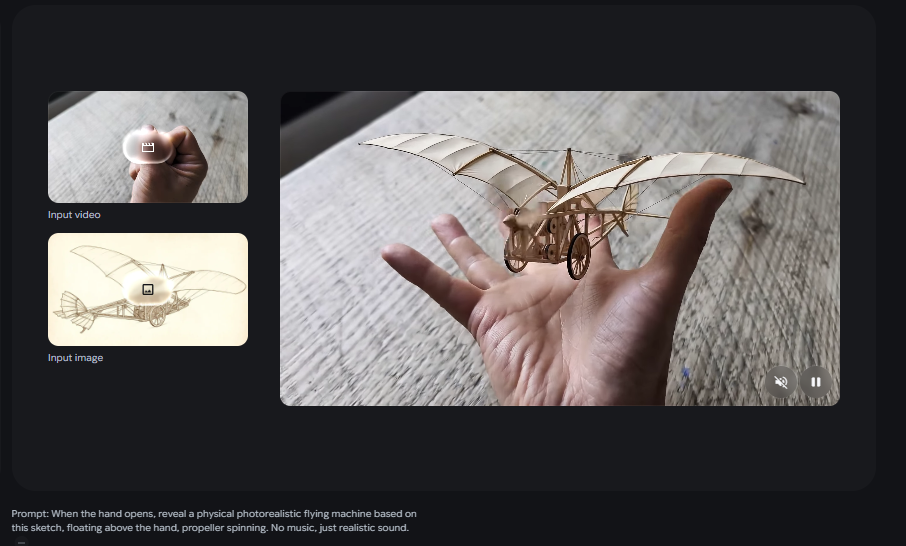
This is categorically different from re-prompting a video generator. Google's own example: "When the person touches the mirror, make the mirror ripple beautifully like liquid, and the person's arm turns into reflective mirror material." — a level of scene-specific, physics-aware instruction that would require frame-by-frame manual editing in any traditional tool.
Hassabis showed off Omni by prompting a clay-animation video explaining protein folding — turning tricky science into visuals you can see. The video maintained physical coherence: materials behaved like clay, movement followed stop-motion logic, and the science was accurately represented. This is the practical expression of the world-model framing: the model understands why things move, not just what similar motion looks like in training data.
Google is taking a cautious approach, ensuring each generated video carries a SynthID digital watermark for authenticity — automatically and invisibly, on every output. It's detectable by Google's tools and, following I/O 2026, also by OpenAI, Kakao, and Eleven Labs, who all adopted the standard.
- 10-second cap — Google says it's a rollout decision, not a model limitation.
- No audio editing — voice replacement and audio modification inside clips are deliberately withheld pending review.
- API not yet open — developer/enterprise access is "coming in the coming weeks" as of May 19.
- Regional & age restrictions — requires 18+ and markets where the Gemini app operates.
Gemini Omni vs. Veo 3.1 — what's the difference?
This is the most common source of confusion. Veo is a dedicated video generation model with limited reasoning. Omni is a reasoning model that happens to generate video — it interprets complex prompts, edits across turns, and accepts richer input types.
| Gemini Omni Flash | Veo 3.1 | |
|---|---|---|
| Input types | Text + image + audio + video | Text + image |
| Conversational editing | ✓ Yes | ✕ No |
| Physics / world sim | ✓ Yes | Partial |
| Max clip length | 10s (current) | ~8s |
| API access | Coming weeks | ✓ Now |
| Best for | Complex, iterative work | High-quality single-gen |
| Free access | YouTube Shorts | Gemini app (~5–10/day) |
The relationship is complementary, not competitive. For the highest single-generation quality and reliable API access today, Veo 3.1 remains the practical choice. For iterative, conversation-driven work — especially combining input types — Gemini Omni is the tool that didn't exist before May 19.
Omni vs. the full competitive field.
Kling 3.0 Omni supports multi-shot sequences with a shared audio timeline and native dialogue in five languages. For raw multi-shot narrative storytelling with native audio, it's ahead on clip length (up to 15s) and multi-scene coherence. Omni's edge is conversational refinement and multimodal input depth.
Runway Gen-4.5 remains the professional standard for camera control precision — shot direction, lens behavior, movement choreography. It's a director's tool. Omni is more a creative collaborator: broader inputs, more natural iteration, but less surgical cinematographic control.
Seedance 2.0 is the clear winner for narrative-driven content with revolutionary multi-shot native capabilities plus synchronized audio-video from a single prompt. For story-first video with multi-shot continuity, it's the strongest today. Omni's native Google ecosystem integration and conversational editing give it a different — not lesser — value proposition.
Sora is no longer a relevant comparison. OpenAI discontinued the Sora web and app experiences on April 26, 2026, and the Sora API will shut down September 24, 2026. Any pipeline that depended on Sora needs to migrate.
| Omni Flash | Kling 3.0 | Runway 4.5 | Seedance 2.0 | Veo 3.1 | |
|---|---|---|---|---|---|
| Conversational edit | ✓ | ✕ | ✕ | ✕ | ✕ |
| Max length | 10s | 15s | 10s | 15–20s | ~8s |
| Native audio | ✓ | ✓ | ✕ | ✓ | ✓ |
| Multi-shot | ✕ | ✓ | Partial | ✓ | ✕ |
| API now | Soon | ✓ | ✓ | ✓ | ✓ |
| Free tier | YT Shorts | 66 cr/day | Limited | ✕ | Gemini app |
How to access Gemini Omni right now.
Gemini Omni Flash is rolling out at no cost on YouTube Shorts and YouTube Create this week. Google is using YouTube's distribution to put Omni in front of hundreds of millions of users at zero marginal cost. Open YouTube Shorts or the Create app, look for the AI video creation option — Omni Flash is the underlying engine. Fastest way to try it, no subscription required.
| Plan | Monthly | Gemini Omni Access |
|---|---|---|
| Google AI Plus | $7.99 | Gemini app + Google Flow |
| Google AI Pro | $19.99 | Full access + higher limits |
| Google AI Ultra | $100 | Priority access + extended quotas |
Video generation consumes a significant portion of daily quota — plan your session for iterative creative work, not bulk production.
In the coming weeks, Google will roll out Omni Flash to developers and enterprises via APIs. No firm date announced. Developers can join the Google AI Studio waitlist and watch the Gemini API release notes.
- Open the Gemini app and sign in on a Plus, Pro, or Ultra plan
- In the model selector, choose Gemini Omni Flash (if rolled out in your region)
- Upload reference material — image, audio clip, or existing video
- Write your first prompt describing what to generate
- Review the 10-second output
- Refine through conversation: "change the lighting," "shift the camera left"
- Download or share directly to YouTube when satisfied
Real-world use cases.
Upload a single product photo, describe the vibe, generate a 10-second Shorts-ready clip with motion and atmosphere — then iterate in conversation until it matches your channel's aesthetic.
Omni is being integrated into Asset Studio for video asset generation inside the Google Ads stack. Generate ad variants from product images and copy, then test them in Demand Gen campaigns without a production shoot.
AI-generated explainers, visual storytelling, news summaries. The protein-folding clay animation demo is exactly this — complex concepts turned into accurate visual explanations without animation expertise.
Generate rough animatics from a shot list, then refine camera angles, lighting, and action through conversation — compressing days of pre-vis into hours.
"Use the attached product photo and create a hero shot: the object rotates 360° on marble, steam rising, studio lighting, soft jazz." A static image becomes a looping video asset, ready for web or social.
Why this matters beyond video.
The bigger shift is that AI video is moving from one-time generation to conversation-led creation. That's not just a UX improvement — it fundamentally changes who can make video. The historical barrier was technical skill: timelines, keyframes, color grading, audio mixing. Omni replaces that learning curve with natural language. You describe what you want. You describe what's wrong. You describe what's next. The model handles the technical translation.
The same world-modeling capability that makes a generated mirror ripple correctly when touched is, at a deeper level, the same capability needed for AI to operate in physical environments — robotics, simulation, scientific modeling.
Hassabis described Omni as a step toward AGI, emphasizing that true progress lies in understanding the physical world, not just producing realistic visuals. For now, the practical reality is more grounded: a model that accepts any media type, generates coherent video, and lets you refine it through conversation is genuinely new. Not incrementally better. Categorically different.
Frequently asked questions.
What is Gemini Omni?
Is Gemini Omni free?
How is Gemini Omni different from Veo?
How long can videos be?
When will the API be available?
What inputs does it accept?
Is audio editing available?
Gemini Omni is not the best video generator available today. What it introduces is something none of those tools offer.
On raw single-generation quality, Kling 3.0 and Veo 3.1 produce more polished clips at longer durations with API access already open. On multi-shot narrative coherence, Seedance 2.0 is ahead. On camera control precision, Runway Gen-4.5 remains the professional standard.
What Omni introduces is a video creation process that works like a conversation. Give it anything — text, photo, audio, footage — get a video, tell it what to change, keep going until it's right. No re-prompting from scratch. No timeline editing. No technical barrier between your creative intent and the output. That is the shift. Not a better generator. A different kind of creation.
Access Gemini Omni — and every video API — through one platform.
When the Omni API opens, you'll have a choice: manage a separate Google Cloud billing account, key, and quota alongside your Kling, Runway, Seedance, and Veo integrations — or access all of them through one gateway.
ai.cc is the unified AI API platform giving developers and content teams one key, one dashboard, one invoice across all major models — Gemini Omni Flash, Veo 3.1, Seedance 2.0, GPT Image 2.0, Suno, and more. When Omni's enterprise API launches, it's available through ai.cc immediately — no additional account setup.
Get started at www.ai.cc →