
 OpenAI - ChatGPT, Sora
 Google - Gemini, Nano Banana
 Anthropic - Claude
 xAI - Grok
 Deepseek
 Alibaba - Qwen
 ByteDance - Doubao
 All Models
 Enterprise Plans
 AI Application Development
 AI Translator API
 AI SEO/GEO Service
 GEO-Optimized PR Service
 Web Scraping Service
 OpenClaw
 Top AI Tools
 Top AI Robots
 Log in


Anthropic Claude Code Desktop Redesign 2026: Multi-Session Support and Routines Automation Deliver Massive Productivity Gains for Developers
In the fast-evolving world of AI-assisted coding, Anthropic just dropped one of the most practical and developer-focused updates of 2026. On April 14, the company rolled out a complete redesign of Claude Code for desktop alongside a powerful new feature called Routines. This isn't just another incremental tweak—it's a full rethink of how developers interact with AI agents, enabling true parallel workflows and cloud-native automation that runs even when your laptop is closed.
I've tested countless coding assistants. This update stands out because it directly solves real pain points: constant context-switching, manual supervision of repetitive tasks, and the frustration of AI that only works while you're staring at the screen. If you're a Pro, Max, Team, or Enterprise Claude user, this is the upgrade you've been waiting for.
Why the Claude Code Desktop Redesign Matters
Claude Code has always been strong for terminal-based agentic coding, but the old desktop experience felt limited—especially for power users juggling multiple projects or long-running tasks. The April 2026 redesign changes that entirely.
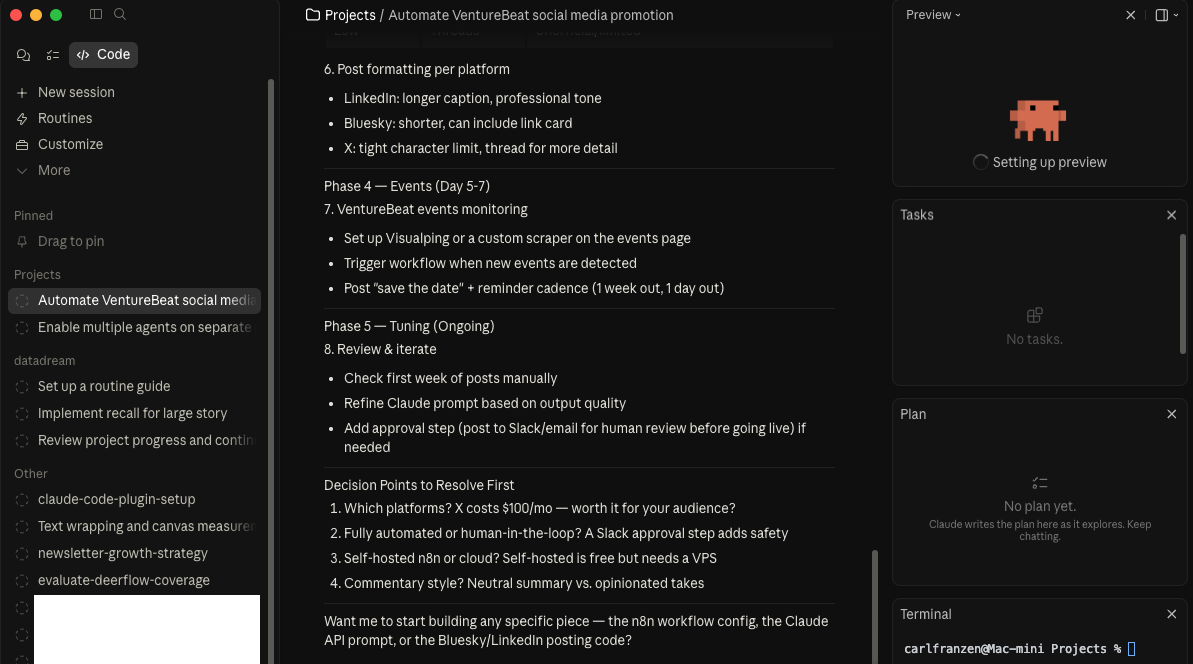
Key highlights of the new desktop app include:
- Multi-session support: Run multiple Claude sessions side-by-side in a single window.
- New sidebar manager: Easily switch between active projects, filter by status or repository, and group sessions logically.
- Drag-and-drop workspace: Customize your layout with panes for code, terminal, preview, and more.
- Integrated tools that reduce app-switching: built-in terminal, in-app file editor, faster diff viewer, and expanded HTML/PDF/local server previews.
Developers on Reddit and X are calling it a "quality-of-life revolution." One power user noted it finally eliminates the need to bounce between Claude, VS Code, and external terminals—Anthropic is essentially building a complete AI-native development environment inside one app.
This redesign isn't just cosmetic. It mirrors how real developers work: not in linear chats, but in parallel streams across repositories, debugging sessions, research spikes, and deployment checks.
Introducing Routines: True Cloud Automation for Claude Code
The star of the update is Routines—saved, autonomous Claude Code tasks that run on Anthropic's cloud infrastructure (not your local machine). Configure once, trigger via schedule, API call, or GitHub events, and let Claude handle the rest.
Here's exactly how Routines work:
- Bundle a prompt + selected repositories + environment variables + any connectors (GitHub, Slack, Linear, etc.).
- Choose triggers: cron-style schedule, API endpoint, or GitHub events (new PR, push, etc.).
- Runs as a full cloud session with shell commands, skills, and autonomous execution—no manual approvals mid-run.
- Results appear as a new session in your desktop app for review, diffing, and one-click PR creation.
Daily limits scale with your plan (Pro: 5 runs, Max: 15, Team/Enterprise: 25), with overage billing available. Crucially, routines don't require your computer to stay on—perfect for overnight builds, daily reports, or weekend monitoring.
This is a massive leap from local scheduled tasks. Routines turn Claude into a true 24/7 teammate that works while you sleep, commute, or focus on high-level architecture.
Real Productivity Impact: Parallel Agents and Hands-Off Execution
Real-world examples:
- Morning PRs on autopilot: Set a routine to review overnight GitHub activity, run tests, and draft PR comments. Wake up to ready-to-ship work.
- Multi-repo orchestration: Keep one session refactoring a legacy module while another runs unit tests on a new feature and a third monitors production logs—all in one window.
- Recurring automation: Daily social media post formatting across LinkedIn/X/Bluesky, event monitoring, or data pipeline health checks.

Compared to manual workflows, Claude Code now compresses hours of context-switching and boilerplate into minutes. It's shifting developers from "coder" to "conductor"—orchestrating AI agents instead of micromanaging every step.
What Developers Are Saying (Unfiltered Feedback)
- "Claude Code just got a full desktop redesign... multi-session support you can now run multiple Claude sessions side by side." (Reddit r/ClaudeCode, 800+ upvotes)
- "Routines let you run prompts on a schedule from Anthropic's cloud without keeping your laptop open." (YouTube breakdowns)
- Japanese developer: "PCつけっぱなしじゃなくても勝手に動いてくれるのが地味にでかい" (translation: the fact it runs without leaving the PC on is huge).
Enterprise teams especially appreciate the scoped permissions, audit trails, and integration with existing GitHub identities—everything appears as your own commits and messages.
Potential Limitations and Best Practices
- Usage caps: Routines count against daily allowances—plan your high-volume automations accordingly.
- Cloud-only execution: Great for most tasks, but sensitive local-only workflows still use desktop scheduled tasks.
- Review discipline: Autonomous runs still require human oversight for final merges and security.
- Learning curve: New sidebar and drag-and-drop take 10-15 minutes to master, but docs are excellent.
Pro tip: Start small—create one routine for a daily code quality check or test suite, then scale to parallel sessions as you get comfortable.
How to Get Started with the New Claude Code Desktop
- Update your desktop app (automatic for existing users on supported plans).
- Open the Schedule page → New task → New remote task for Routines.
- Experiment with multi-session layout in the main Code view.
- Check the official docs at code.claude.com for connectors and triggers.
The update is live now for all Pro+ users. If you're still on the free tier, this is strong motivation to upgrade.

The Bigger Picture: Claude Code as Your AI Operating System
Anthropic isn't just releasing features—they're building Claude Code into the daily operating system top developers actually use. Multi-session + Routines complete the vision of reliable, always-available agentic workflows.
Whether you're shipping features faster, reducing context fatigue, or finally automating those repetitive devops chores, this update delivers measurable ROI in hours saved per week.
As someone who's spent years helping teams adopt AI tools at scale through www.ai.cc, I can confidently say: tools like this are why AI coding is moving from "nice-to-have" to "can't-live-without." The future isn't one super-intelligent model—it's a well-orchestrated fleet of specialized agents working in parallel.
If you're as excited about these leaps as we are, stay ahead of the curve with the latest AI tool roundups, benchmarks, and hands-on guides. Discover more game-changing updates, curated workflows, and expert insights at aicc—your hub for practical AI productivity at www.ai.cc.
Claude Code is no longer just an assistant — it's becoming the environment.